Home  /  Blog  /  AI Governance

Playbook

How to Implement AI
Governance in Organizations (2026)?

Cisco found that about 75% of organizations already have an AI governance body — but only 12% consider it mature. Here's a practical, five-step way to close that gap.

To implement AI governance in organizations and enterprises, first build a central inventory of AI models, vendors, agents, data sources, and use cases (like on Nicklpass), and then assign each an accountable owner and risk rating. Next, set clear usage and data-sharing policies, control access and procurement, require stronger review for high-risk systems, train employees, and monitor incidents and performance.

Cisco found that about 75% of organizations have an AI governance body, but only 12% consider their governance mature.

How can organizations build responsible AI governance?

Step 1:See what AI your company is already using

You can't govern AI your organization can't see. So start by finding every AI tool your employees are using, and document who's using it, what you're paying for, and how it got into the company — that includes official tools, team subscriptions, and the random AI app someone bought on a corporate card six months ago.
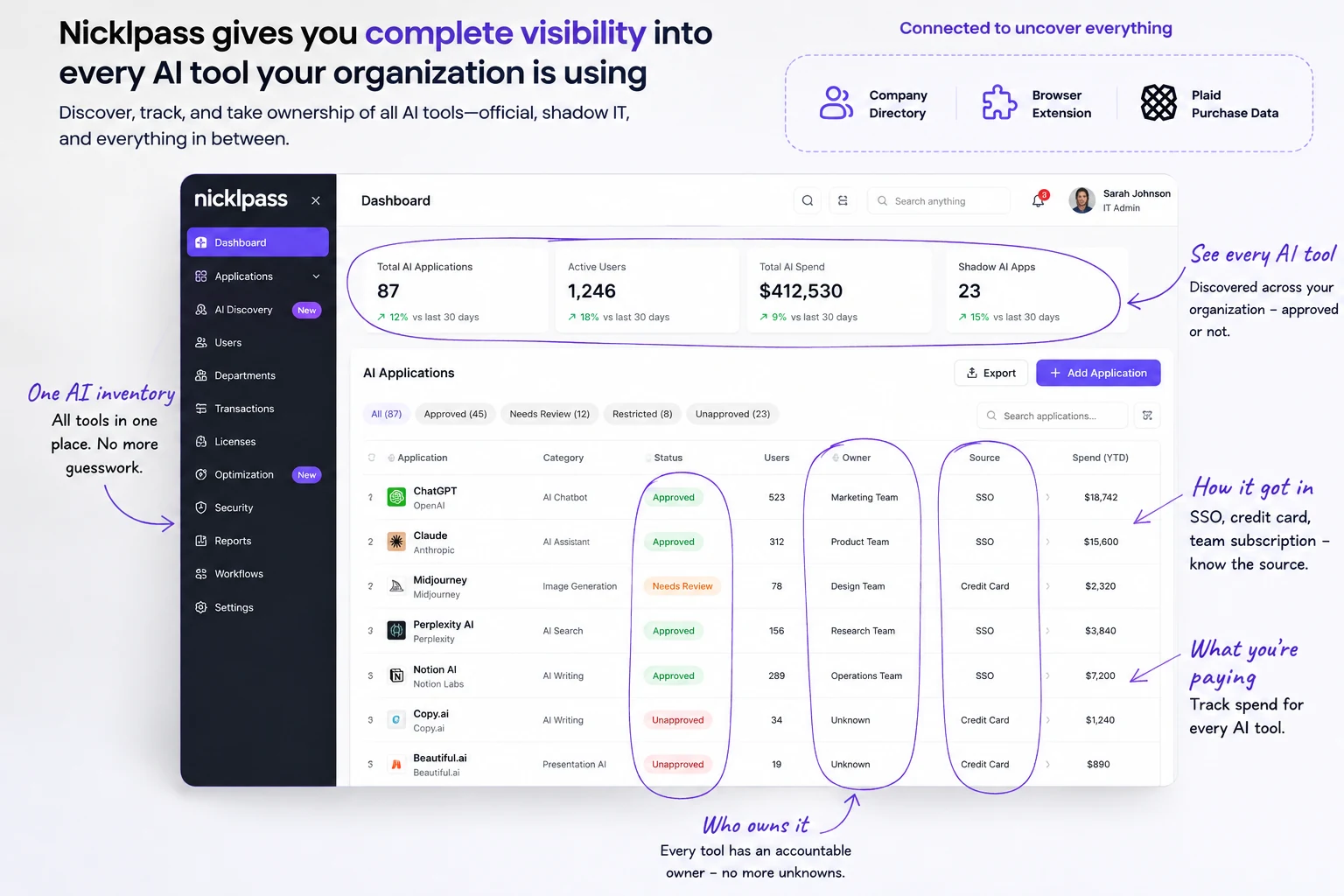
Nicklpass dashboard showing total AI applications, active users, total spend, and shadow AI apps discovered across the organization
Connect Nicklpass to your directory, browser extension, and Plaid to build one AI-powered software inventory.
In June 2026, one IT leader asked how companies track employee use of ChatGPT, Claude, and Gemini (i.e., not just what they spend, but what people are actually using them for). One respondent described combining web filtering, approved domains, endpoint security, and monthly AI-tool reviews, then added:

Step 2:Decide what is safe, and what needs more review

Once you know what exists (like Claude, Copilot, AI agents, or built-in SaaS AI features), separate everyday AI from higher-risk use cases. A writing assistant like Perplexity doesn't need as many controls as a tool screening job candidates (like HireVue) or an AI system handling confidential customer data (i.e., Salesforce).
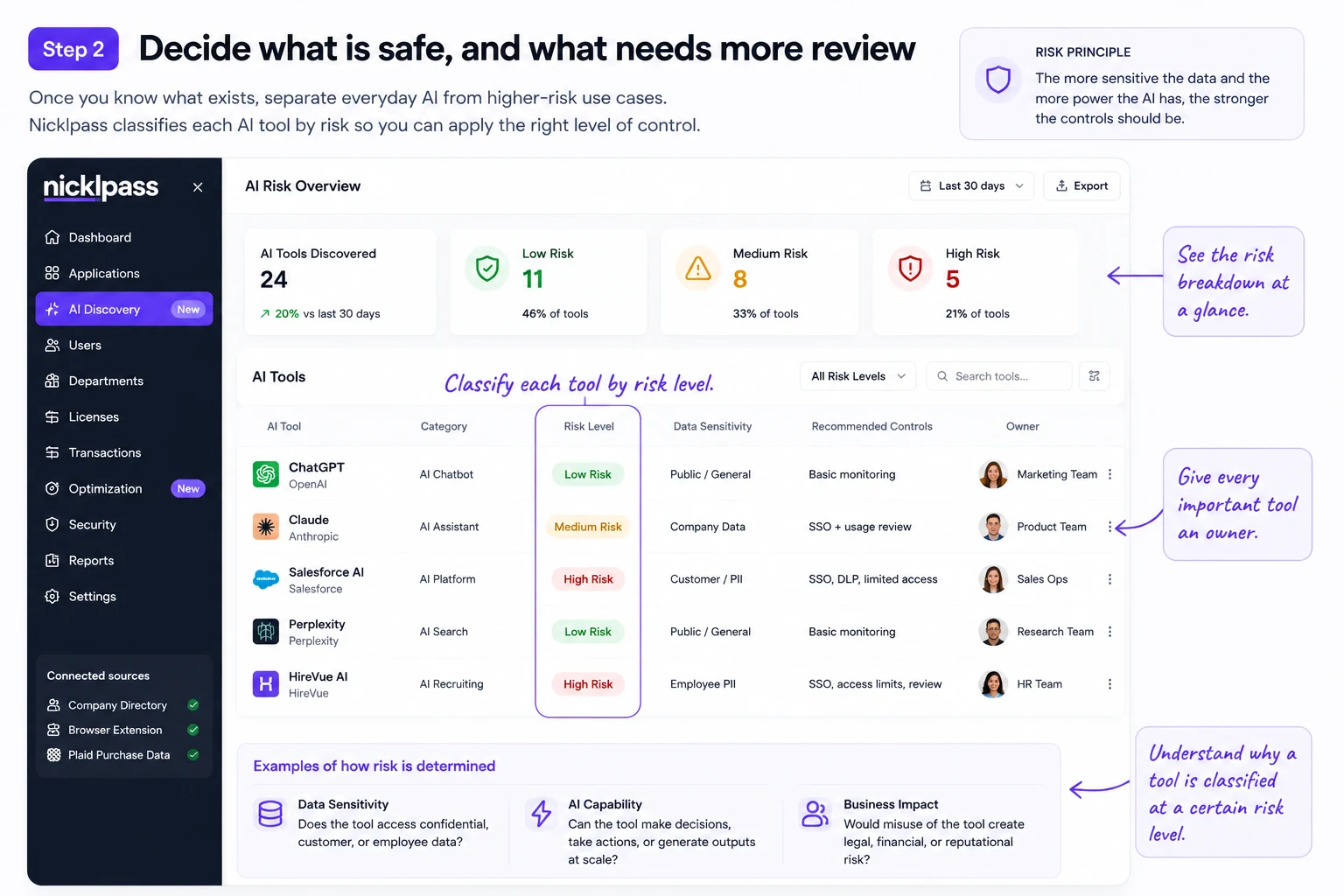
Nicklpass AI risk overview classifying tools as low, medium, or high risk with recommended controls and owners
Use Nicklpass's real usage, application, and ownership signals to classify every AI tool as approved, restricted, needs review, or prohibited.
One sysadmin said they started drafting an AI acceptable-use policy after an employee uploaded proprietary company information into ChatGPT. Employees input sensitive information into AI tools (e.g., Gemini) about once every three days.

Step 3:Control who gets access

Decide who can use each AI tool (such as developers, marketers, or finance teams), which account they should use (company account, SSO login, or approved enterprise workspace), and who approves new licenses (i.e., IT, a team manager, or procurement).
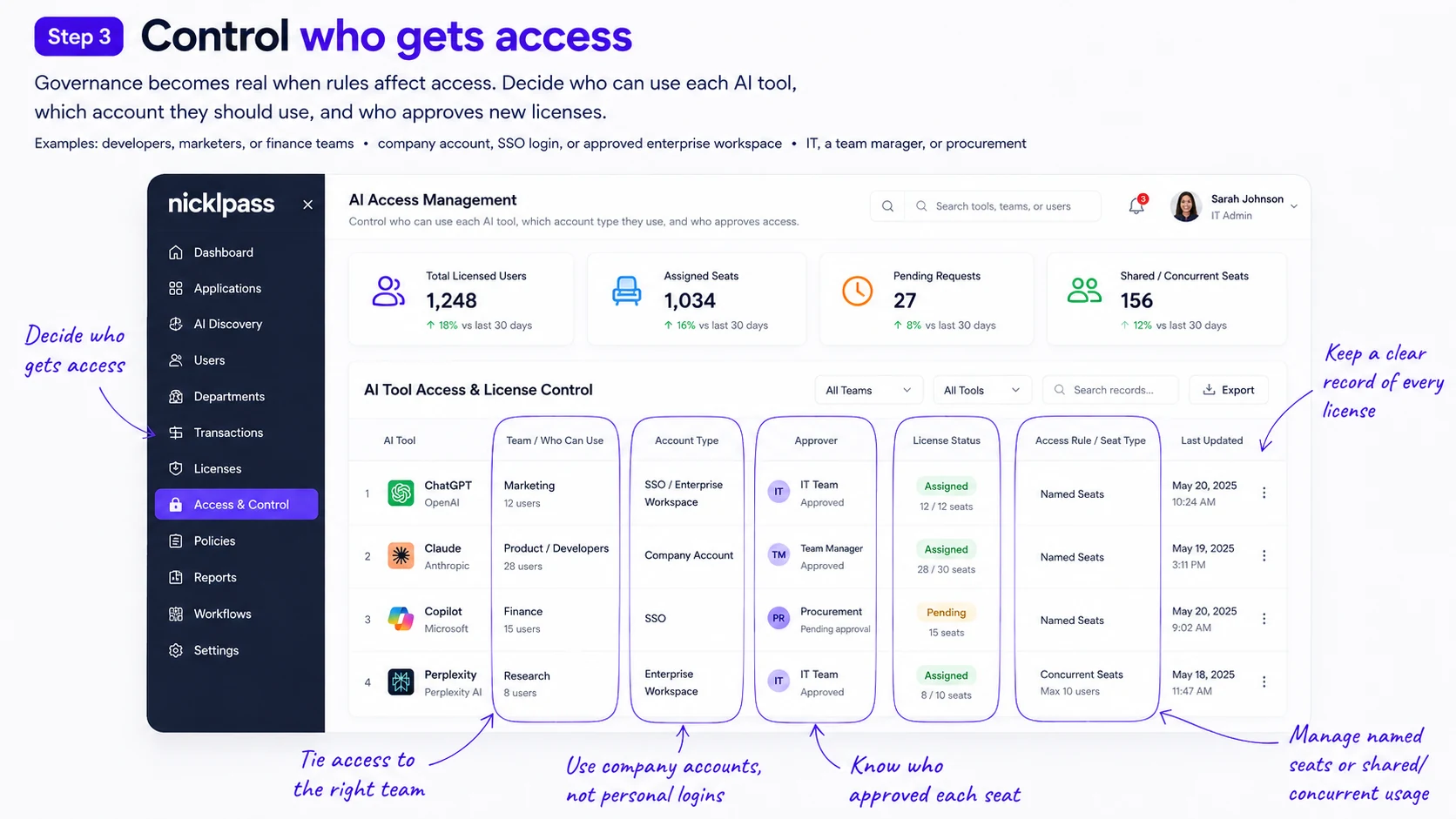
Nicklpass AI access and license control showing total licensed users, assigned seats, pending requests, and approver for each tool
Use Nicklpass to control who gets access to approved AI tools, instead of relying on policy alone.
One IT manager described allowing approved AI apps only through enterprise plans with SSO and conditional access, blocking unapproved AI apps, and requiring employees to go through IT before adding browser extensions or integrations.

Step 4:Watch usage, cost, and waste

Do not approve an AI tool and forget about it. Review usage after the first 30–60 days, then quarterly and before every renewal, to catch inactive users, sudden usage spikes, and licenses the business no longer needs.
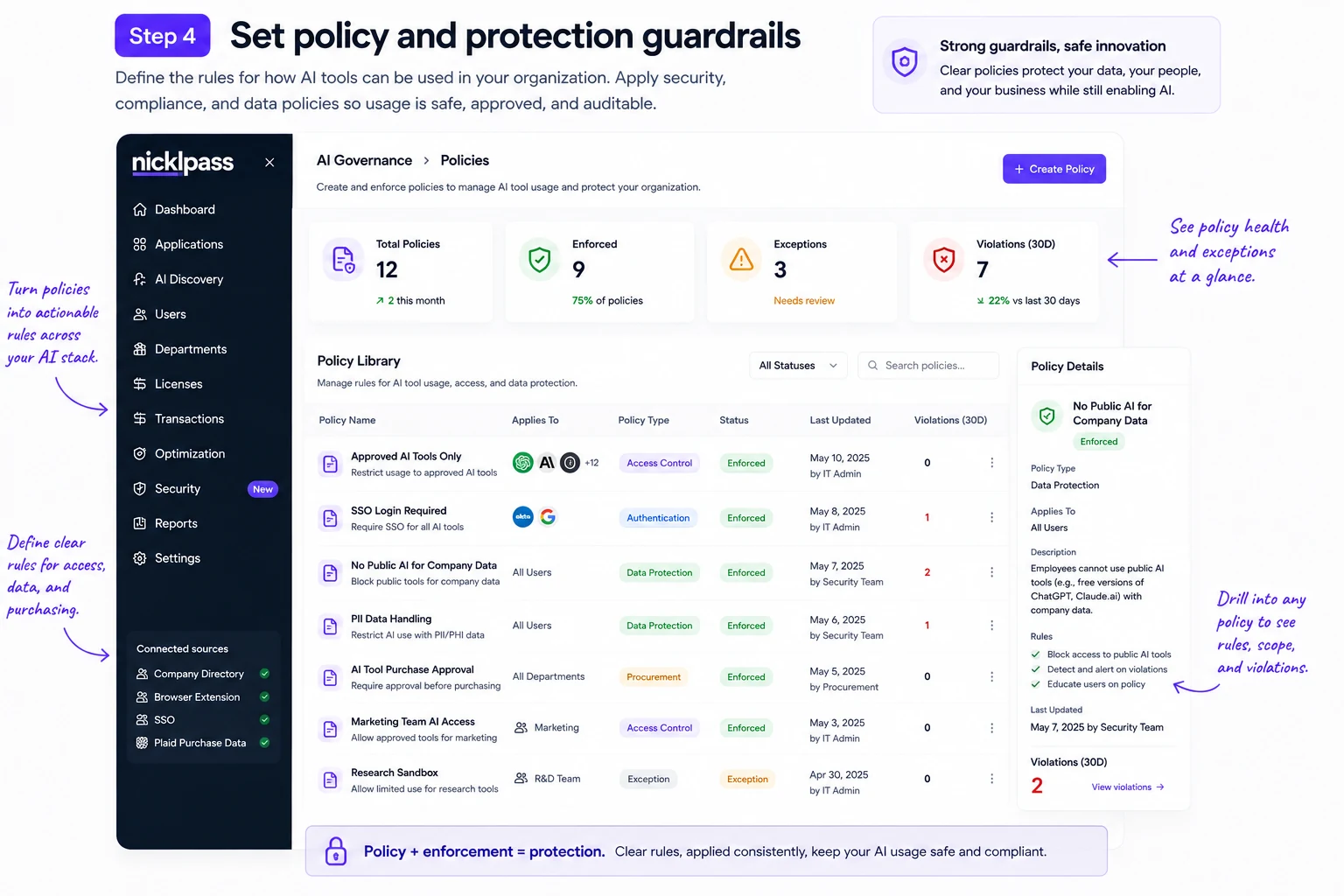
Nicklpass policy library showing enforced AI access, authentication, and data-protection policies with violation counts
Use Nicklpass to track AI usage, costs, unused licenses, and unusual activity in one place.
One enterprise Copilot user described that Finance knows the cost of Copilot seats, but the seat bill alone showed no actual usage. Additional agent and Azure consumption appeared elsewhere, making it harder to tell what the organization was really spending and using.

Step 5:Keep improving the system

AI governance is ongoing because employees adopt new tools, vendors add new features, and low-risk apps can quickly become critical to the business. Use what you learn from usage, incidents, new purchases, and employee requests to update your approved-tool list and controls.
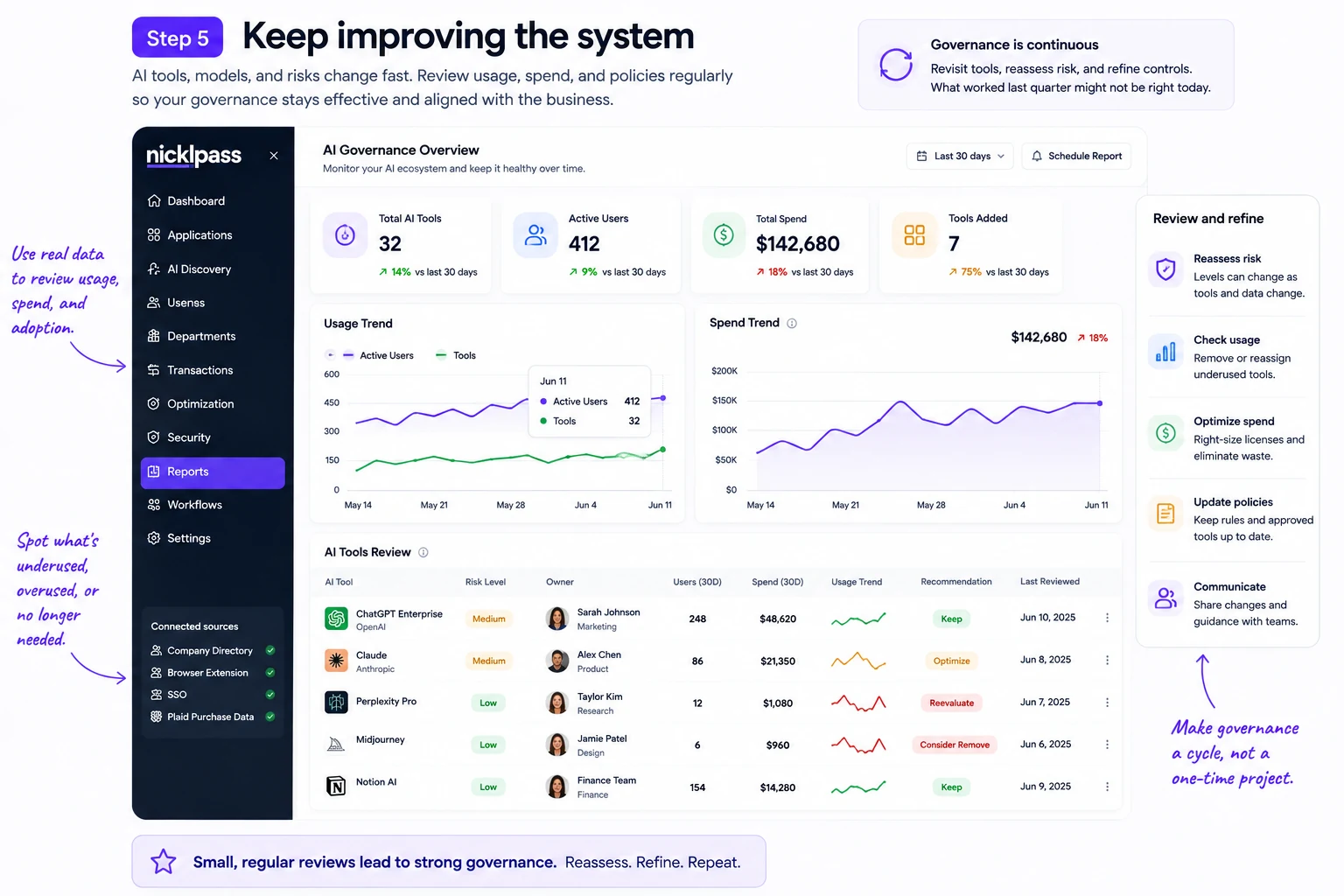
Nicklpass AI governance overview showing usage trend, spend trend, and per-tool recommendations like keep, optimize, or consider remove
Track software spend, usage, AI activity, and license ownership on Nicklpass, then review and adjust as things change.

After changes involving ChatGPT raised new concerns in 2026, discussions around continuing approved tools while reconsidering controls around company data has been trending.

What's the 30% rule in AI

In business, it usually means letting AI handle roughly 70% of repetitive or administrative work while humans own the final 30% that needs judgment, creativity, context, or accountability. Research supports the idea of keeping humans involved, but not the exact 70/30 split.

A study of 758 BCG consultants found AI improved speed and quality on suitable tasks, yet made people 19% less likely to get the right answer on a task outside AI's capabilities.

Take accountability and start with visibility

So start governing your AI's transformation and let Nicklpass bring your tools, usage, spend/ licenses all into one place so you can see what should be prioritized.

Start governing what you can't see yet

Nicklpass brings your AI tools, usage, spend, and licenses into one place, so you know what to prioritize first.
